The National Portal of Business Registration is an official website where organisations and individuals can do online business registration, access information on business registration or implement the issuance of Business registration certificate. Providing information on business registration is one of the important functions of the National Portal. There is information which is provided public and free of charge on the Portal, i.e: name of enterprises, enterprise code, head office address, name of representatives, legal status of an enterprise. Currently, the Portal is supporting online users with search engine tool, including Instant search and Advanced search to help users with more effective searching.
1. Instant search:
Instant search is a tool that allows the result appears right after only two letters are entered into the Search box. The instant search is available on the three utilities of the Portal: online business registration, information service and e-gazette (enterprise annoucement on business registration).
In order to find out quickly information on an enterprise or a subordinate unit of the enterprise by Instant search tool, users can enter key words belonging to 5 criteria including enterprise name, enterprise short name, enterprise name in foreign language, enterprise code, or internal code (a unique code used on National Business Registration System called NBRS code).

Picture 1. Screen displays the results after entering 2 letters
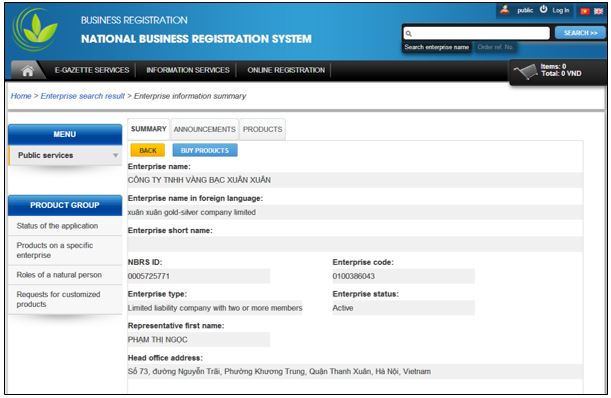
When users tick on one of the search suggestions displayed on the screen, the screen will turn to a new one which shows information of the selected enterprise or subordinate unit in details. Then, the screen will display details on the enterprise name, enterprise short name, enterprise name in foreign language, enterprise code, or NBRS code, enterprise type, enterprise status, name of representative, head office address.
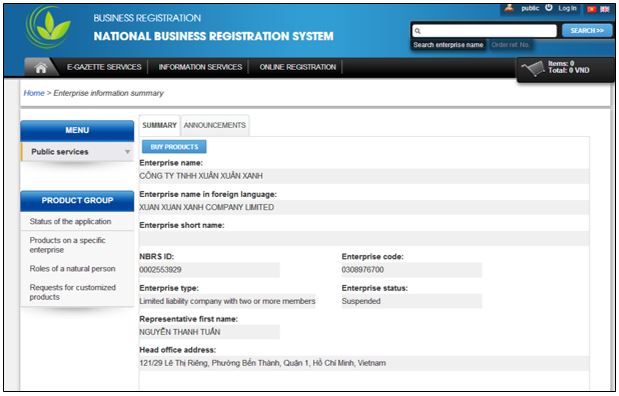
Picture 2: Screen after selecting a company named “Công ty TNHH Xuân Xuân Xanh”
2. Advanced search:
Advanced search tool is available on utilities of the Portal including: online business registration, information service and e-gazette. If users do not select any of the suggestion of instant search, but click on “SEARCH” button on the screen or press “Enter” button on the keyboard, the screen will navigate to advanced search screen.
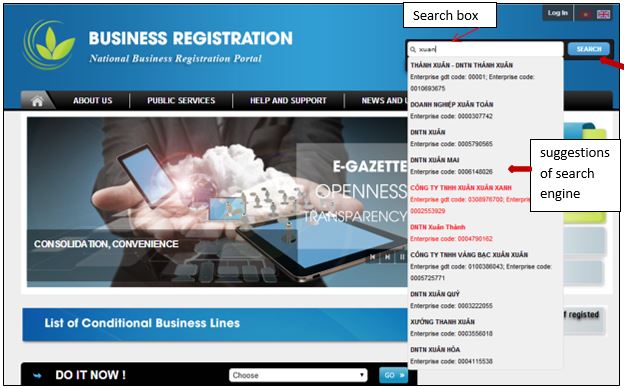
Picture 3. Screen displays the result before selecting either Instant search or Advanced search
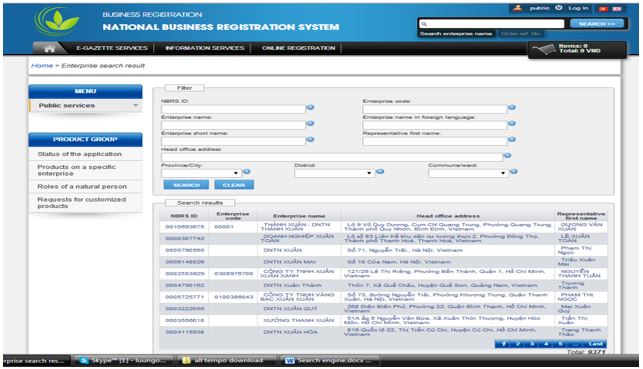
Picture 4. Screen displays results of advanced search after click on “SEARCH” on the screen or press “ENTER” on keyboard
Advanced search helps users to look up for more criteria than Instant search does. Thus, users can search information based on such criteria as: enterprise name, enterprise short name, enterprise name in foreign language, enterprise code, or NBRS code, enterprise type, enterprise status, name of representative, head office address, province/city, district, ward/commune. These criteria apprear under the [Filter] of the search screen
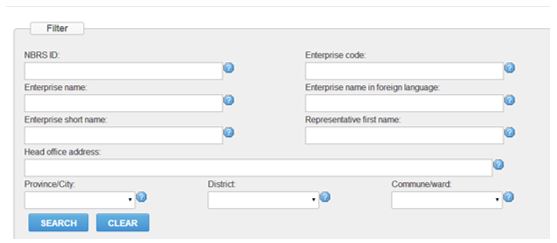
Picture 5. {Filter} screen
From the enterprise list displayed on the screen, users can see the search result in details of each enterprise by click on one of the fields of information i.e: NBRS code, enterprise code, enterprise name, head office address, name of representative of that enterprise.

Picture 6. Screen of search result
Picture 7. Screen displays advanced search result of one specific enterprise
A part from free information which can be exploited by the above search engines, organizations and individuals can access to Information service on the Portal to exploit legal information on business registration, consisting of: status of the application, products on a specific enterprise, roles of natural person, customized product, etc. The information is provided with an aim to facilitating business performance of enterprises, as well as improving the social observation to business community.
(Source: Agency for Business Registration, MPI)